How to Track DoorDash Mileage to Keep More of What You Earn
If you deliver for DoorDash, driving is both your tool and your biggest expense. A simple, consistent approach to tracking miles turns vague guesswork into real savings and clearer records. Below are practical steps, tools, and smart habits that make mileage tracking manageable and useful.
1. Why mileage matters: expenses, earnings, and clarity
Mileage is often the largest day‑to‑day cost for delivery drivers—fuel, tires, oil changes, and extra wear add up. Tracking miles helps you compare what you earn per hour or per shift against what you spend on the road. For example, if you notice certain neighborhoods drain more fuel for fewer orders, you can shift to busier zones or different times. Good mileage records also let you analyze whether a higher‑paying drive actually nets more after gas and maintenance. Build a simple weekly log to spot trends: note miles driven, hours worked, and fuel spent so you can tweak when and where you dash.
2. What DoorDash reports — and what it doesn’t
DoorDash provides limited distance details tied to individual orders, usually the mileage between pickup and drop‑off, but it doesn’t capture everything you drive during a shift. That means deadhead miles—getting to restaurants, between deliveries, or returning home—aren’t included in platform estimates. Use those in‑app figures only as a rough reference; they’re not a substitute for a full record if you plan to reconcile expenses or prepare taxes. A practical approach: treat DoorDash’s numbers as one data point, then supplement them with your own totals to reflect the full scope of driving you actually do each day.
3. Automatic mileage apps: set it and forget it
Automatic tracking apps use GPS to separate personal and business trips and export reports you can share with an accountant. To use them efficiently, enable background tracking, tag any ambiguous trips as business, and set rules for recurring routes. Practical example: start a shift and let the app record every trip; at the end of the day, review the list and merge short hops or deliveries that belong together. Be mindful of battery and data use—turn on low‑power modes if available and charge while you drive. These apps save time and reduce errors compared with manual logs.
4. Low‑tech tracking that still protects your records
A paper logbook or spreadsheet is a reliable fallback when you prefer privacy or encounter app glitches. Record the date, odometer start and end, purpose, and route notes for each shift. For example, jot down odometer readings before you begin dashing and again when you finish; later transfer totals to a monthly spreadsheet. If you accidentally miss a few entries, use the DoorDash app to pull order distances and reconstruct miles as a last resort. Keep receipts and a simple maintenance log—these manual methods are inexpensive and accepted when kept consistent and legible.
5. How to translate miles into usable deductions
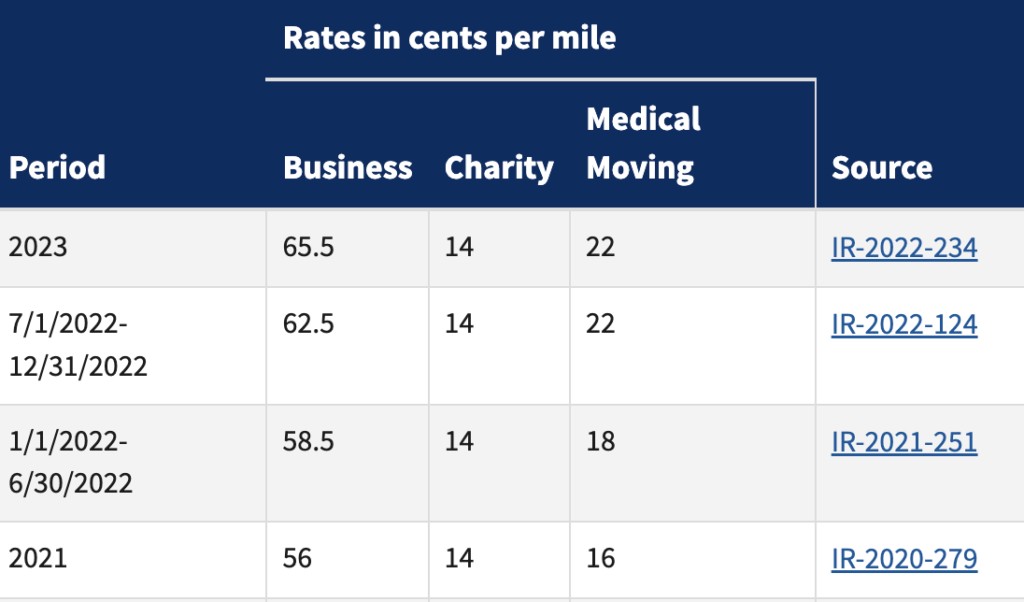
When it’s time to account for vehicle costs, there are two paths: a per‑mile approach and an expense‑by‑expense method. The per‑mile route multiplies your documented business miles by a standard rate set by tax authorities, offering simplicity and easy reporting. The actual expense method tallies fuel, repairs, insurance, and depreciation to reflect true operating costs but requires more receipts and recordkeeping. Practical tip: run both methods for a sample year to see which yields the bigger benefit for your situation. Always mark business versus personal use clearly so that only eligible miles are included.
6. Extra ways to cut costs and stretch each gallon
Beyond tracking, small operational changes can raise your take‑home pay. Plan routes to cluster deliveries, use navigation tools that avoid congestion, and schedule shifts when demand is steady. Use fuel rewards, cashback apps, or store loyalty programs to lower per‑gallon costs; even modest savings add up over weeks. Maintain tire pressure and follow recommended service intervals to improve fuel economy and extend vehicle life. If you have access to Dasher discounts or driver perks, check them regularly—occasional offers on maintenance or apps can reduce recurring expenses.
7. Simple routines that keep your records usable
Make tracking a habit: start each shift with a quick odometer check or open your app, and finish by reviewing that day’s trips. Back up digital logs to cloud storage and file paper notes monthly. Keep records for several years in case you need them later, and reconcile totals quarterly so surprises don’t pile up at filing time. For example, set a weekly reminder to export your app report or update your spreadsheet. Consistency turns mileage tracking from a chore into a tool for smarter scheduling, better budgeting, and clearer earnings.
Accurate mileage tracking doesn’t require perfection—just a consistent system that fits your rhythm. Whether you choose an automatic app, a paper log, or a mix of both, clear records help you evaluate routes, control costs, and preserve options when you need reliable reports. Start small, refine your routine, and treat mileage as another part of your delivery toolkit.