Track Smarter, Earn Better: A Shopper’s Guide to Instacart Mileage and Money Management
If you drive for Instacart, the trips you make are part of your workday and your expenses. The app only shows part of the picture, so building a simple system for recording miles and related costs will protect your earnings and make tax time less painful. Below are seven focused sections that walk you through what the app does and doesn’t do, why mileage matters, practical tracking methods, other deductible costs to watch for, how pay actually handles fuel, ways to boost take-home pay, and how to tie it all together in one sustainable routine.
1. What Instacart Records — and What It Doesn’t
Instacart’s interface will often display the store-to-customer distance for a delivery, but it does not automatically capture every mile you drive while working. Your commute to the first store, trips between multiple stores, and driving back to a high-request area are typically not reflected in the app’s delivery distance. That gap means you must assume responsibility for tracking the full scope of work miles if you want an accurate view of costs. Practical example: treat the app’s shown distance as only part of the record and supplement it with your own log for the start-of-shift trip, intra-shift deadhead miles and the trip home.
2. Why Every Mile Matters: Taxes, Wear and Profitability
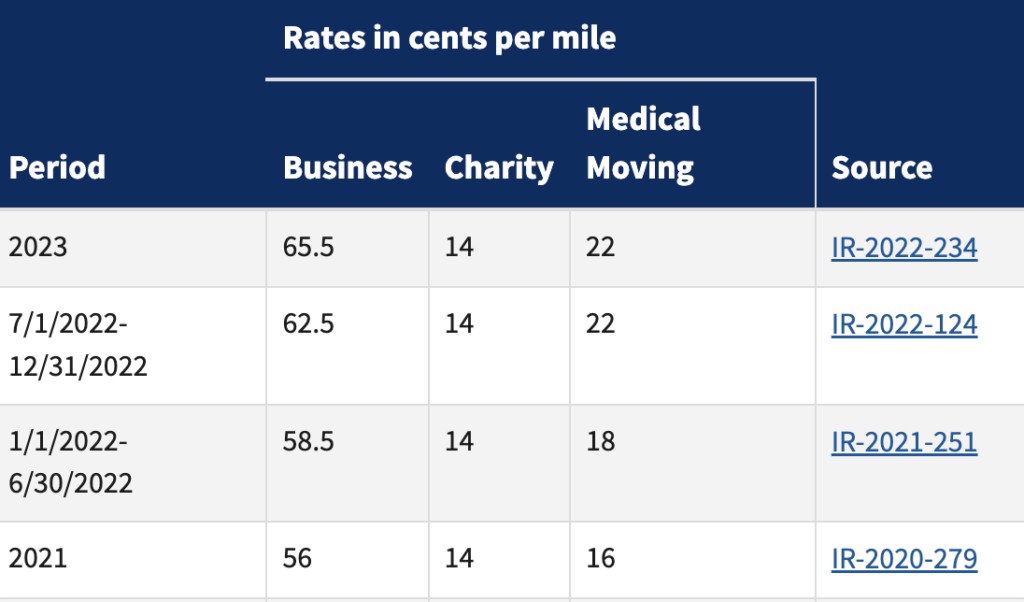
Mileage isn’t just a metric; it’s a business expense that affects your taxable income and the real profitability of each shift. Driving more means greater fuel, maintenance, and depreciation costs, so tracking miles helps you calculate true net earnings and set aside funds for repairs or replacement. For example, if you compare two shifts—one with many short trips close to home and another with long runs between stores—you may find the per-hour take-home quite different once vehicle costs are included. Keeping precise records can also support legitimate tax deductions and protect you if you’re ever asked to document business travel.
3. Practical Ways to Track Your Instacart Mileage
Choose a tracking method that fits your routine and stick with it. Popular approaches include automatic GPS mileage apps that label trips as business or personal, a simple spreadsheet where you record start and end odometer readings, or a paper log kept in the glovebox for quick entries. Whatever you pick, add trip purpose, date, start/end points and miles so records are clear. Example workflow: when you start a shift open your app or start your spreadsheet, note starting odometer or begin automatic tracking, label the entries as Instacart, and export or back up the data weekly. Consistency beats complexity—regular snapshots are better than sporadic perfect records.
4. Other Expenses to Track Alongside Mileage
Mileage is often the biggest vehicle-related deduction, but other costs can reduce taxable income too: a share of your phone bill, insulated delivery bags, parking and tolls, roadside assistance plans, and car insurance are commonly business-related expenses. The key is to document what you use for work: keep receipts, note the business percentage of shared services like a phone plan, and store invoices for gear purchases. For instance, if you use your phone half the time for deliveries, log that percentage and save monthly bills. If you park to make a delivery or pay a toll, tuck away the receipt to support your records.
5. How Instacart Handles Fuel Costs in Pay
Instacart factors a modest mileage or fuel component into its batch payments, but that addition is not a per-mile reimbursement that fully covers your gas or wear-and-tear. In practice, the built-in fuel amount helps a little, but most shoppers still absorb the larger portion of vehicle costs. Practical response: treat any fuel-related pay as a small supplement and continue tracking your own mileage and expenses. When evaluating whether a batch is worthwhile, factor your expected driving and likely fuel outlay into the decision before accepting an order to avoid taking jobs that look good on-screen but lose money when costs are tallied.
6. Boosting Your Earnings Beyond Tracking Miles
Tracking expenses is necessary, but there are ways to increase what you keep. Be selective with batches so you avoid long repositioning drives; favor runs with efficient routes and promising tips. Learn store layouts to speed shopping, use insulated bags to protect items and earn better ratings, and communicate clearly with customers to increase tips and repeat requests. Consider working peak windows or using multiple platforms to fill slow times. Example tactic: batch nearby orders when possible, finish high-tip shifts during busy grocery hours, and rotate between services to smooth income across the week.
7. Making a Simple, Sustainable System That Sticks
Build a routine that bundles tracking, backups, and cash management so you’re not reinventing the wheel each week. Keep a dedicated folder—digital or physical—for receipts, export mileage logs regularly, and reconcile them with your app earnings to spot discrepancies. Set up a small maintenance reserve from each shift so oil changes and tires aren’t surprises. For example, export a mileage report monthly, match it to deposits, and move a fixed percentage into a vehicle savings account. And whenever uncertainty about tax treatment arises, make a habit of consulting a qualified tax advisor to keep your bookkeeping aligned with current rules.
Tracking your miles and related expenses turns driving from a vague cost into actionable data that protects earnings and informs decisions. Start with one simple tracking method, be consistent about records, and pair that discipline with smarter batch choices and basic record-keeping. Over time those small changes add up to clearer profits and less stress at tax time.